Loading SEC Edgar 10-Q Information Into PostgreSQL RDBMS Using Arelle
As mentioned in the previous section of the tutorial, rather than roll our own XBRL parser and ETL utility, we will rely on Arelle, a third-party package, to perform these tasks on our behalf.
Arelle is a general purpose XBRL package, which is able to parse and display any kind of financial reporting represented in XBRL format (not just those reports filed with the SEC). In this tutorial, we will only be utilizing a subset of Arelle's capabilities, specifically those that relate to pulling 10-Q information from the SEC Edgar database and storing it in a relational database schema.
Figure 2.1 below illustrates Arelle's role in the data acquisition and loading processes.
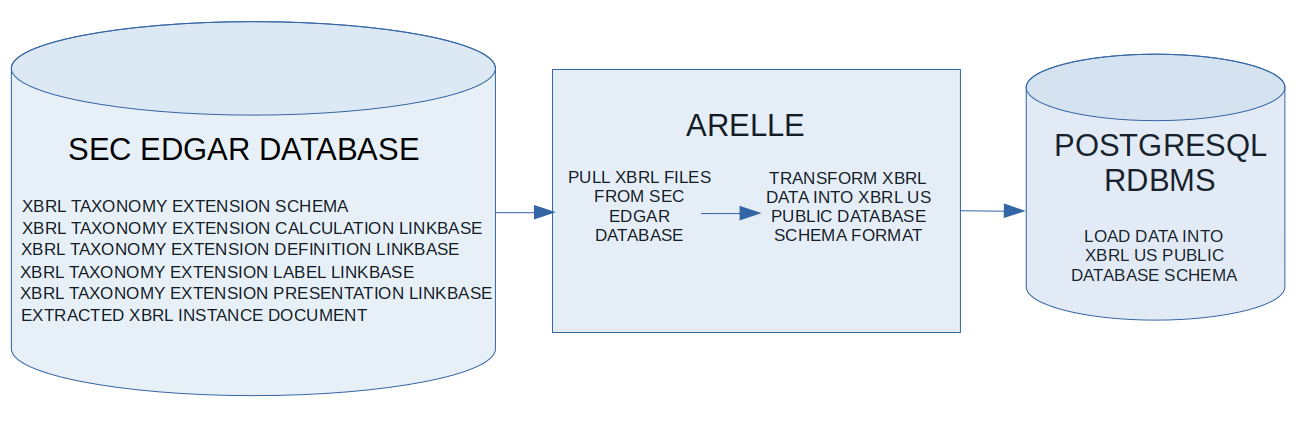
Figure 2.1
We will use Arelle to:
- Pull the XBRL files for a company's 10-Q filing for a given reporting date from the SEC Edgar database (we have already seen examples of these files in the "Data Files" section of the Edgar Filing Details in Figure 1.6 of the previous section of the tutorial)
- Parse the files and transform the information into a format Arelle will use for loading into its XBRL US Public Database Schema format, and
- Load the transformed data into a relational database that has the XBRL US Public Database Schema installed (Currently, Arelle only supports the US Public Database Schema format on the PostgreSQL RDBMS product)
This tutorial will make use of the open-source software packages listed below, and assumes that you have them installed on your computer:
While it is not mandatory, I would also recommend installing the open-source software packages listed below, which will make using Arelle and PostgreSQL more convenient:
- DBeaver Community Edition (follow this link for download and installation instructions). DBeaver is a powerful GUI front end for use with many different database products (PostgreSQL included). Without a GUI front end, it's possible to issue commands to PostgreSQL through its command line interface, but this will become cumbersome before too long. PostgreSQL comes with it's own GUI front end which can also be used when following the tutorial; DBeaver is a personal preference.
- The Python Programming Language version 3.8 (follow this link for download and installation instructions). Strictly speaking, Python is not necessary to follow along with the tutorial. Anything we will do with Arelle can be accomplished from your operating system's command line. However, if you use this tutorial as a springboard to automate the download and ingestion of large amounts of information from the SEC Edgar database using Arelle, you are eventually going to have to write some code. Arelle has a Python API (which this tutorial will not cover), so it is a logical choice.
In the next section of the tutorial, we will assume that Arelle and PostgreSQL are installed. We will then show how to install Arelle's XBRL US Public Database Schema on PostgreSQL. After that, we will see how to use Arelle's arelleCmdLine command to load a company's 10-Q filing information into PostgreSQL.
© Copyright 2020, Crosskeys Technologies